Is There an MCP Server for FreeCAD? (Quick Answer)
Yes. FreeCAD supports the Model Context Protocol (MCP) through open-source community bridges—most notably neka-nat/freecad-mcp (installed via uvx freecad-mcp + an in-app RPC Addon) and the Robust MCP Bridge Workbench (documented on the official FreeCAD Wiki). Both allow Claude Desktop, Claude Code, OpenAI Codex CLI, and Cursor to create parametric solids, execute FreeCAD Python macros, inspect documents, and even trigger FEM analyses locally.
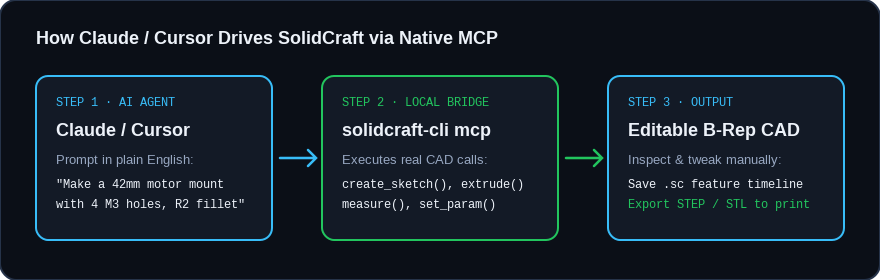
FreeCAD MCP Options vs. SolidCraft Native MCP
Before installing an addon, compare the three main open-source AI + Parametric CAD MCP setups available in 2026:
| Feature | neka-nat/freecad-mcp |
Robust MCP Bridge Workbench | SolidCraft Native MCP (solidcraft-cli mcp) |
|---|---|---|---|
| Official Project | github.com/neka-nat/freecad-mcp / PyPI | FreeCAD Wiki Bridge | First-party built into SolidCraft |
| Architecture | FreeCAD Addon (RPC Server) + Python uvx MCP client |
Dedicated FreeCAD Workbench + PyPI/Docker MCP server | Single pure-Rust binary (stdio headless or live --connect) |
| Setup Complexity | Medium (install Mod addon + start RPC server + uvx) |
Medium (install Workbench + connect bridge) | Low (1 command: solidcraft-cli mcp setup or claude mcp add) |
| CAD Depth (CAM, FEM, Drawings) | Full FreeCAD ecosystem (Part Design, FEM, TechDraw, Python) | Full FreeCAD workbench & scripting ecosystem | Fast modern B-rep timeline (3D printing & rapid prototyping focus) |
| Headless / Browser Support | Desktop FreeCAD must stay open with RPC running | Desktop bridge or Docker deployment | Native headless CLI + live desktop bridge + WebAssembly app |
How to Install FreeCAD MCP (neka-nat/freecad-mcp) Step by Step
Setting up freecad-mcp takes two coordinated steps: enabling the RPC listener inside FreeCAD, and registering the uvx freecad-mcp server inside your AI client.
Step 1: Install the FreeCAD MCP Addon
- Clone the repository from GitHub (or download the ZIP release):
git clone https://github.com/neka-nat/freecad-mcp.git
Copy the
addon/FreeCADMCPfolder into your operating system's FreeCADModdirectory:- Windows:
%APPDATA%\FreeCAD\Mod\ - macOS:
~/Library/Application Support/FreeCAD/Mod/ - Linux:
~/.local/share/FreeCAD/Mod/(or~/.FreeCAD/Mod/on older builds)
- Windows:
Launch FreeCAD, open the Workbench dropdown at the top, select MCP Addon, and click Start RPC Server on the toolbar. Keep FreeCAD open while your AI client sends commands.
Step 2: Install uv and Configure Claude Desktop, Cursor or Codex
The Python MCP package runs cleanly without manual virtual environments using uvx (from Astral's uv package manager).
Claude Desktop (claude_desktop_config.json) & Cursor (.cursor/mcp.json)
{
  "mcpServers": {
    "freecad": {
      "command": "uvx",
      "args": ["freecad-mcp"]
    }
  }
}
Claude Code & OpenAI Codex CLI
# Claude Code
claude mcp add freecad -- uvx freecad-mcp

# OpenAI Codex CLI
codex mcp add freecad -- uvx freecad-mcp
Restart your AI client completely after saving the config, verify that FreeCAD's RPC Server is running, and test a simple prompt:
"Create a new FreeCAD document, model a 50mm x 50mm x 5mm mounting plate with four 4.2mm M4 corner holes, capture a viewport screenshot, and export STEP."
Troubleshooting Common FreeCAD MCP Setup Errors
uvx: command not foundinside Claude Desktop: GUI apps on macOS and Windows often ignore shellPATHedits. Replace"command": "uvx"with the absolute path touvx(runwhich uvxon macOS/Linux orwhere.exe uvxon Windows PowerShell).- Connection Refused / Timeout Talking to FreeCAD: This almost always means FreeCAD is closed or you forgot to switch to the MCP Addon workbench and click Start RPC Server. Every fresh FreeCAD restart requires starting the RPC listener again unless auto-start is configured.
- Python Macro Syntax or Geometry Errors: Because FreeCAD MCP frequently executes FreeCAD Python API calls (
Part,PartDesign,Sketcher), instruct Claude or Codex to build incrementally, verifyobj.Shape.isValid(), and inspect bounding-box dimensions after each boolean cut. - Using FreeCAD Behind Docker or CI? Explore the Robust MCP Bridge Workbench on the FreeCAD Wiki, which provides PyPI and Docker Hub bridge images tailored for structured multi-tool setups.
FreeCAD MCP vs. SolidCraft MCP: Which Should You Use?
Both ecosystems are free, open-source, and run 100% locally without cloud lock-in, so choosing between them comes down to your engineering requirements:
- Pick FreeCAD MCP if your project requires mature FEM stress analysis, Path CNC CAM toolpaths, TechDraw 2D drafting sheets, SheetMetal, or custom FreeCAD Python macros inside an established desktop suite.
- Pick SolidCraft MCP if you want zero-friction setup (no Python
uvxruntime or manual RPC addon copying), faster pure-Rust parametric rebuilds for 3D-printed brackets and enclosures, or headless CLI automation (solidcraft-cli mcp) that works identically with or without a GUI window. - Use Both Together via STEP: Many makers prototype rapidly using SolidCraft MCP & Claude or our SolidCraft CLI & Prompt Builder, export a clean
.stepsolid, and import it into FreeCAD whenever a part later needs FEM simulation, assemblies, or CNC CAM.
Want the full architectural comparison between the two CAD apps? Read SolidCraft vs FreeCAD vs Fusion 360, check our SolidCraft Install Guide, or return to the AI CAD Guide homepage.